

Q: I recently purchased a new Dell all-in-one personal computer with Windows 10. After a couple of months I feel that it runs much slower than my old tower that had Vista. At dinner with a much more computer savvy friend I mentioned this and he (attributed) it to “Cortana” running in the background even if you are not using it. During setup of my new computer I did not activate this feature. Is he correct and if so is there a way to shut it off and increase my speed? — Frank Vigil
Tech+ Hard to say. Sluggishness could be due a number of things. Usually it’s some processor-hogging software.
But… have you already compared the hardware inside the two machines? All-in-one PCs are not necessarily more powerful than an older tower. Memory, processor (and its speed) are very important.
At this point however, it’s too late to bemoan your purchase. But we can check what program is eating up more than its fair share of memory or processing power.
Push the Control+Alt+Delete buttons to get to the Windows Task Manager. Under “Processes,” sort by “Memory” so the heaviest user is at the top (sort by clicking the title of the memory tab). You’ll get a visual cue as to what is using the most memory and CPU power.
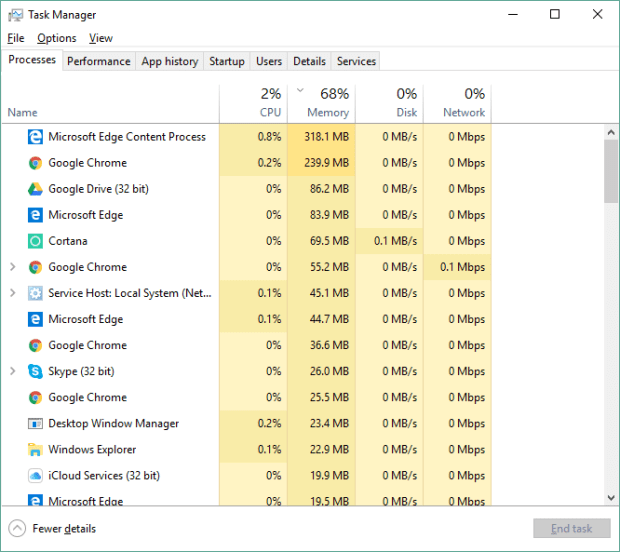
Right click a program and you can stop it. But if it’s part of the system, it’ll relaunch when you reboot.

Yes, there are lots of complaints online about Cortana, Microsoft’s virtual personal assistant, using more than its fair share of computer processing power. But I feel the same way about many other programs, from any Adobe product to Google Chrome.
Still, there are ways to tame Cortana. Go to Cortana’s search bar, type in “turn off Cortana.” It’ll tell you that Cortana is built into Windows so it can’t be fully shut off.
But you can “disable” it by on ZDNet:
This actually doesn’t completely rid the machine of Cortana. You just don’t see Cortana, only a search bar. But Cortana still showed up among the processes running on my Windows 10 machine (spotted by opening the Task Manager). However, its memory use dwindled to about 0.1 MB from about 60 MB.
The main thing to be aware of when it comes to Cortana is that it’s a helper tool from Microsoft. To help you the most, it wants to know everything you search for and it needs access to your calendar, e-mail, messages, etc. If that is a bit worrisome, you can tweak privacy settings on Cortana. Microsoft even has directions at .
UPDATE: In the Tech+ Q&A from March 13 (), this update goes to readers who unsuccessfully tried to change their Google Chrome settings to limit targeted ads. The website address shared doesn’t work unless you add a “https://www” — so type this: