

Q: I don’t know how, but my files suddenly lost their Microsoft icons and now display an Internet Explorer logo. When I try to open the files, I get a window that says, “View downloads — Internet Explorer.” A specific file is then shown, with the question, “Do you want to open or save this file?” When I click on “open” all the window does is flicker, and it does not open. I cannot access the file. Any suggestions? ~ Arnie
Tech+ That would be confusing to see a library full of Internet Explorer icons.
By Googling “Windows changed all my icons,” I found an official this can happen when the icon cache is not updated correctly. This has affected Windows XP, Vista and 7 systems. Essentially, you’ll need to and restart the computer to resolve the icon issue. The steps to fix this issue are posted on Microsoft’s site, at .
Separately, if you type in “Desktop icons” in the Windows search area, a new window opens that says “Desktop Icon Settings.” This area lets you change the image for Windows icons like Recycle Bin, This PC and Network.

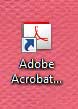
It’s also simple to change the image for shortcut files, typically the files placed on your Windows desktop for fast access. A shortcut file has a little arrow in the bottom left corner that points northeast.
- Right click the shortcut icon and select “Properties.”
- In the “Shortcut” tab, select “Change icon.”
- This will show you the options available, or you select “Browse” to find more images.
- Icons typically end with “.ico,” so if you want to customize the image for your desktop, you can use a program like Photoshop to create more .ico images.
Coming soon: The Tech+ newsletter. Sign up for the future newsletter, view past Tech+ answers or ask your own tech question at . If you’re emailing your question, please add “Mailbag” to the subject line.